
Type that feels right.
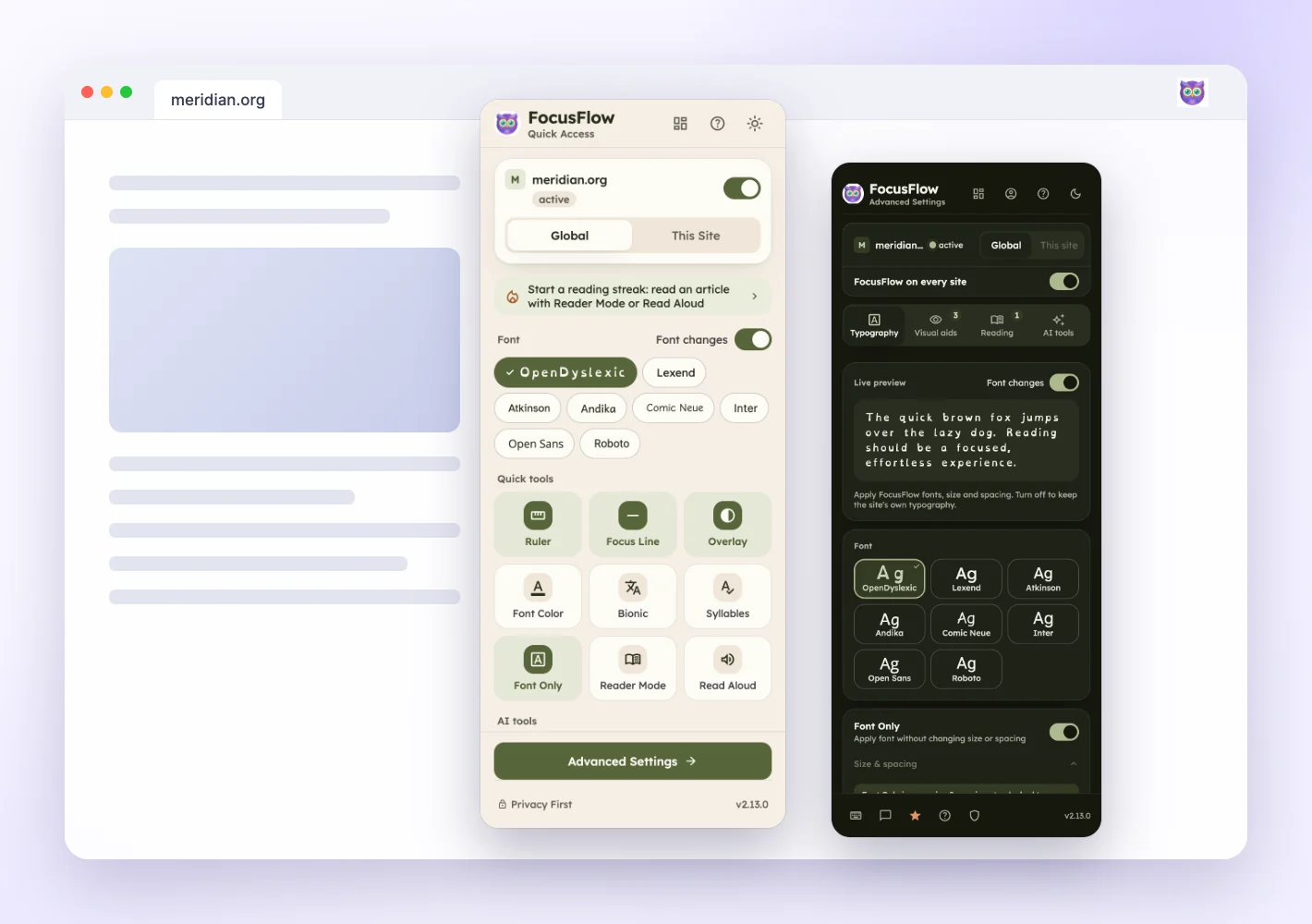
Choose from 8 reading-friendly fonts. Fine-tune text size, line height, and spacing — then save what works for each website and review it on the Sites page.
Less clutter. More comfort. Make the web work for you with friendly fonts, fewer distractions, and reading tools that fit your mind.
Free reading tools. No account needed to get started.
A whole reading toolkit.
One friendly extension.
From a quick article to a deep reading session, small adjustments can make your space feel more comfortable.
Choose from 8 reading-friendly fonts. Fine-tune text size, line height, and spacing — then save what works for each website and review it on the Sites page.
Reader Mode clears away ads, navigation, and visual clutter, leaving a quiet space for the article. Press Read aloud in the top bar, or open Insights for a free readability score.
A reading ruler, Focus Line, and color overlays help you keep your place on busy pages.
Switch from reading to listening with read-aloud. Let the words come to you, at your own pace.
Define a word, simplify a passage, or find the key points with the Pro AI reading assistant.
Meet your assistantTry a few adjustments. There’s no single right way to read — just the way that works for you.
The web is full of wonderful ideas. But between the crowded layouts, tiny text, and endless distractions, it’s easy to lose the thread.
Sometimes, a little breathing room is all it takes. A clearer font. A softer background. A moment to focus on one idea at a time.
Make yourself comfortable. The next good idea can wait until you’re ready.
This demo changes only the sample above. The extension brings reading controls to the websites you visit, in six themes that follow your device until you pick one.
Explore reading themesResearch rabbit holes. Study sessions. The documentation you need to get through. Find a little more flow in all of it.
From the first lecture notes to the last revision. Make long articles and study materials more comfortable to read.
A reading workspace for papers, journals, and the next big question. Less visual noise between you and the evidence.
Documentation, API references, tutorials, and one more tab. Make technical reading easier on your eyes.
Reports, industry news, and all the reading your work brings. Turn your browser into a better place to take it in.
Built with dyslexia, ADHD, and different reading preferences in mind. Choose the tools that feel useful to you.
Your preferences are personal. Your reading space should be, too.
A tricky term or a wall of text doesn’t have to stop your flow. Select text to define, simplify, summarize, or check your understanding without leaving the page. In Reader Mode, every tool sits behind one AI tools button.
Explore the AI assistantYour brain can hold only so much information at once. That mental effort is called cognitive load.
Illustrative examples · no AI request is sent from this preview
Prefer to start in your browser? Our free web tools are ready when you are. No install. No sign-up.
See all free toolsPaste your text. Adjust fonts, spacing, and colors.
Settle in and read your way.
Check text and background contrast against
WCAG AA and AAA requirements.
Want a dedicated reading view? Explore our
lightweight, on-device Reader extension.
Install the free extension from your browser’s add-on store.
Choose your font, adjust spacing, and try a reading aid.
Read your favorite websites with settings that feel right.
Everything you need to take the first step toward a more comfortable reading space.
Visit the help centerYes. The core reading tools are free, including font and typography controls, reading aids, Reader Mode, and read-aloud. FocusFlow Pro adds capabilities such as AI assistance and Reader Mode PDF export. Check the Pro page for current pricing and plan details.
FocusFlow is designed with different reading needs in mind, including dyslexia and ADHD. Anyone who prefers clearer text, more comfortable colors, or fewer distractions can use its reading tools.
FocusFlow works on many standard webpages. Browser settings pages, add-on stores, some built-in PDF viewers, and other protected pages may restrict extensions. Individual sites may also limit how their content can be changed.
You can get started with the free reading tools without an account. Settings and your reading statistics stay on your device unless you enable Pro sync. AI features send the text you ask about to online services; see the privacy policy for the current details.
Your fonts. Your colors. Your comfortable corner of the web.
Start with the free tools. Make yourself at home.